How to Automate SEO with Codex and Claude
The lazy version of AI SEO is to spam out a pile of shitty vibed-out blog posts and hope one catches a tailwind.
That’s an approach to content marketing. Just not a great one.
Publishing more content can expand the number of searches your app can answer. But it does nothing to fix an app that is difficult for search engines to crawl, understand, or index. Stale sitemaps, broken canonicals, weak internal links, incomplete metadata, and slow pages can quietly limit everything you publish.
You also need to learn from the traffic you already earn. Tools like Google Search Console reveal the language people use to find you and the pages Google chooses to show, often in ways you can't predict. PostHog or another analytics platform completes the picture by showing whether those visitors continue into the product and find value.
I think of these as two branches of SEO optimization:
- Technical SEO makes the app easy for search engines to crawl, understand, index, and serve.
- Search demand optimization learns how people discover the app, what that reveals about what they want, and whether they find value after arriving.
Throughout this guide, I’ll refer to them as the technical loop and the demand loop.
SEO is a slow feedback system. It takes regular attention over many months: inspect the app, study the evidence, make a focused improvement, and measure what happens next.
How agents make the SEO improvement loop faster and more consistent
Codex and Claude make that routine much easier. They can inspect the application itself, operate authenticated analytics dashboards through browser use to help pull and digest data, and schedule recurring reviews at whatever cadence you choose.
What makes this especially effective is the combination of capabilities inside the Codex and Claude apps. A scheduled reminder can carry the complete review instructions. Browser use and plugins give the agent fresh evidence from authenticated services. Repository and development tools let it connect that evidence to the application itself. Each run can then record what changed and what the next run should measure.
The agent is not simply repeating an audit. Every review begins with more evidence and better questions than the one before it. That is where the compounding comes from.
Here’s a simple but complete setup for doing that every week.
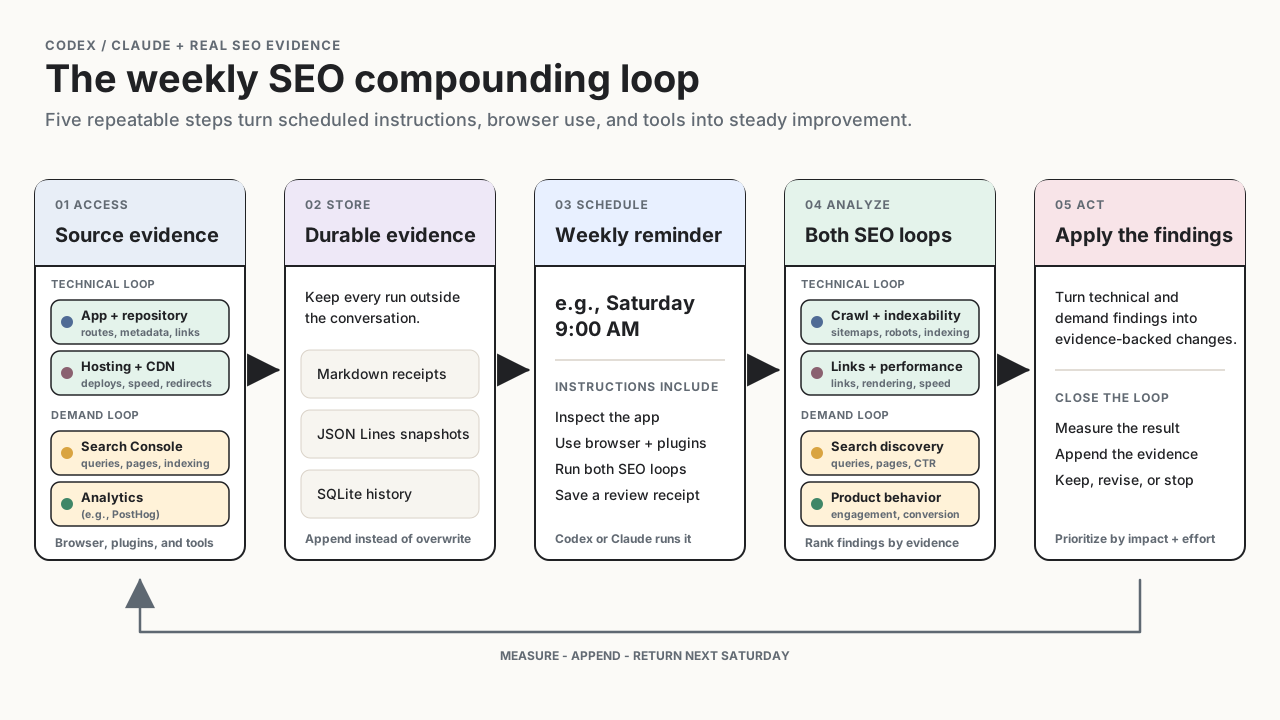
Step 1: Give the agent access to the evidence
Before scheduling anything, make sure the agent can reach the systems it needs.
For Codex, you can use the built-in browser or the Chrome extension. The built-in browser has a separate browser profile, so sign into your analytics and hosting accounts there (when you first start using it - you'll get prompted to carry over logins from Chrome so this is easy). Use the Chrome extension when you want Codex to work from your existing signed-in Chrome profile.
Claude has the same general options through Claude Code with Chrome and Claude's desktop tools.
At minimum, connect or sign into:
- Google Search Console for search queries, pages, impressions, clicks, indexing, sitemaps, and Core Web Vitals.
- PostHog, Google Analytics, or another product analytics service for landing pages, visitor behavior, funnels, and conversions.
- Your hosting and CDN provider, such as Vercel or Cloudflare, for deployment, caching, redirects, performance, and production errors.
- An optional SEO platform such as Semrush Site Audit for broader crawling, rank tracking, backlinks, and competitor research.
Browser access is enough to begin. A plugin, MCP server, CLI, or API is usually better for repeatable structured queries. I use the PostHog plugin when it is available and browser use when it is not.
The agent should also have access to the application repository. The dashboards show symptoms; the repository often explains them.
Step 2: Give evidence a durable home
You don't want your demand loop data to live only in an ephemeral Codex / Claude session. You want it written to disk so that a) it can be easily referenced from disk by your agent and b) so that you have a durable record of the past for future comparison / use.
Start with the lightest durable format that supports the comparisons you want:
- Markdown works well for a dated, human-readable weekly receipt containing the evidence, interpretation, decision, and next measurement date.
- JSON Lines gives you an append-only series of structured snapshots that scripts and agents can compare without rewriting previous runs.
- SQLite is useful once you want to query many weeks, pages, keywords, cohorts, or apps and perform more involved week-over-week analysis.
Whichever format you choose, preserve the observation window and timezone, sources and filters, raw metrics, technical findings, changes since the previous run, action taken, and next review date. Append new evidence instead of overwriting the old baseline. Store aggregate analytics rather than credentials, email addresses, or other user-level personal data.
Step 3: Create the weekly SEO reminder
In Codex, I use a scheduled task. My current reminder runs every Saturday at 9:00 AM.
A basic useful first version can be as simple as:
Every Saturday morning, remind me to run the technical SEO and search demand optimization loops for this app.
But a reminder becomes much more valuable when it runs the review for you.
When the longer task executes, the agent runs both loops. For the technical loop, it inspects the application repository, production site, hosting, and CDN configuration for anything limiting crawlability, indexability, or performance. For the demand loop, it uses the built-in browser or Chrome extension, along with plugins, to gather fresh evidence through your existing authenticated sessions in platforms such as Google Search Console and PostHog. It then compares the new evidence with previous runs, produces a focused report, and saves a durable receipt for the next review.
Here is a fuller prompt you can paste into Codex or adapt for Claude Code Desktop scheduled tasks:
Create a recurring task for every Saturday at 9:00 AM to run a
read-only SEO review for this app.

First, inspect the application, repository, production site, hosting,
and CDN configuration. Use subagents where helpful. Look for technical
SEO improvements involving crawlability, indexing, sitemaps, robots.txt,
canonicals, redirects, status codes, metadata, structured data, internal
links, mobile rendering, Core Web Vitals, performance, and production
errors.

Next, use the Codex App's built-in browser to open our authenticated
Google Search Console property. Review the latest complete 7 days and
compare them with the preceding 7 days. Analyze queries, landing pages,
clicks, impressions, CTR, average position, indexing, sitemap status,
and Core Web Vitals. Identify surprising queries, pages gaining or
losing visibility, high-impression pages with weak CTR, and relevant
queries where we rank outside the top results.

Then use the PostHog plugin to review organic
landing traffic and the path from those pages to the product's meaningful
conversion event. Exclude internal and known bot traffic where possible.

Return a succinct report with two sections:
1. Technical loop: Technical SEO improvement areas
2. Demand loop: Search demand and user-behavior opportunities

Rank no more than three recommendations by evidence, likely impact, and
effort. Include exact date windows, source links, caveats, and what changed
since the previous review. If the evidence is too thin, say so. Do not
change code, production, hosting, or analytics without my approval.

After the report, save a durable review receipt with the date window,
sources, filters, metrics, findings, action, and next measurement date.
Use a dated Markdown file by default, or append to the project's existing
JSON Lines or SQLite evidence store. Never store credentials or user-level
personal data.
The exact schedule matters less than consistency. Weekly is frequent enough to catch regressions and notice movement without pretending SEO changes overnight.
Step 4: Analyze the report
The weekly report feeds two related optimization loops.
The technical loop: Technical SEO
The agent will inspect the live site and the code behind it for things like:
- Pages blocked by
robots.txt,noindex, authentication, or incorrect status codes - Missing, stale, or polluted XML sitemaps
- Incorrect canonicals, redirect chains, duplicate pages, and URL variants
- Missing or weak titles, descriptions, headings, image text, and structured data
- Broken internal links, orphaned pages, and poor information architecture
- Mobile rendering, JavaScript rendering, Core Web Vitals, and slow assets
- Hosting, CDN, caching, compression, TLS, and production-error problems
This is where an agent is especially useful. It can connect a warning in Search Console to a route, metadata component, Cloudflare rule, deployment, or sitemap generator in the repository.
The demand loop: Search demand optimization
The demand loop combines what happened before the click with what happened after it.
Search discovery
Search Console's Performance report shows what happened before someone reached the site. Look for:
- Unexpected queries already leading people to you
- Pages and queries with sustained impression growth
- High-impression results with weak CTR at a comparable position
- Relevant queries ranking around positions 4–20
- Multiple pages competing for the same intent
- Useful queries sending visitors to the wrong landing page
These are clues about what users want. The response may be a better title, clearer copy, stronger internal links, an expanded product page, a focused supporting article, or no change at all.
Product behavior
PostHog or another similar analytics tool shows what happened after the click. Did organic visitors continue into the product? Did they complete the important action? Did one landing page, device, or browser perform unusually poorly? Did an error or slow experience stop them?
Search Console clicks and PostHog sessions will not match exactly because of consent, blockers, bots, attribution, timezones, and different counting rules. Compare direction and cohorts instead of forcing the totals to reconcile.
Step 5: Act on one evidence-backed improvement
Choose the strongest opportunity from either the technical loop or the demand loop. Make one change - or one tightly related package of changes - and record it in the durable evidence store. Limiting the work keeps the next comparison interpretable. If you change the title, page structure, internal links, and conversion flow at the same time, the next report cannot tell you which hypothesis was useful.
One week you fix a broken canonical. The next you discover that people are finding the app through a use case you never considered. Then you strengthen that page, improve its internal links, and measure whether those visitors actually use the product.
That is the compounding loop: inspect, learn, improve, measure, repeat.
No individual SEO review is a silver bullet. The advantage of Codex and Claude is that reminders, browser access, tools, and durable evidence keep the detailed analysis-and-improvement loop running on a regular cadence.
References and setup guides
- Codex: built-in browser, Chrome extension, and scheduled tasks
- Claude: Claude Code with Chrome and desktop scheduled tasks
- Search data: Google Search Console and its Performance report
- Product and SEO analytics: PostHog Web Analytics and Semrush Site Audit